Concinnity Onboarding Platform

JAN-PRO Pipeline Automation System for Franchise

Franchise Lead Nurturing

Stage 1 - Raw

This stage is the primary nurture stage, and is triggered based on:

Leads are automatically added into the raw stage coming from various lead channels such as but not limited to Franchise Opt-in form fills, Facebook ads, and Google ads.

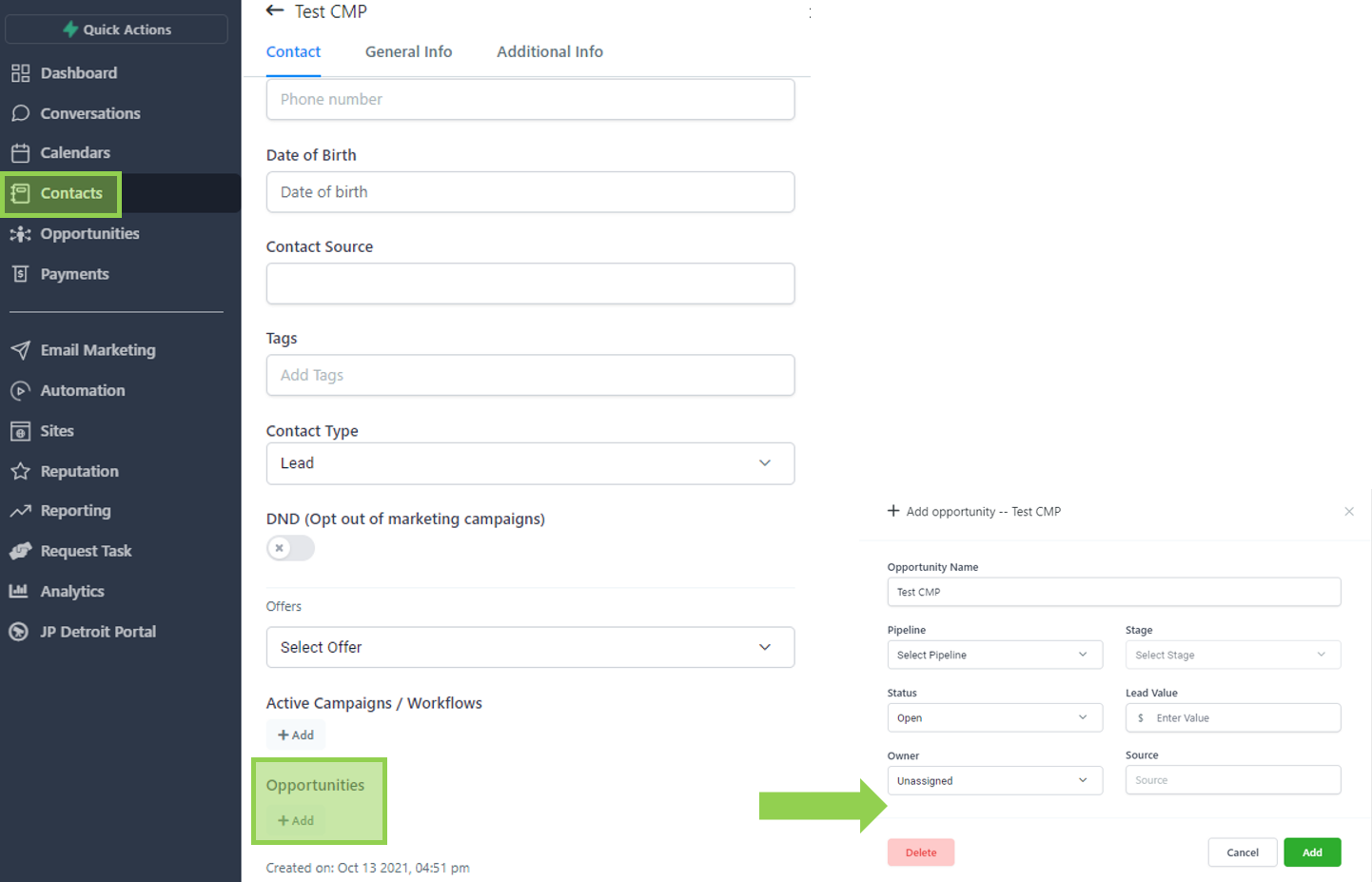
Alternatively, you can also manually create an opportunity by opening the contact record, selecting add under opportunities, and selecting the corresponding pipeline and raw stage.
Leads are automatically removed from this stage as soon as they are progressed to the next stage.
This can happen in two ways:

  • Scenario 1: Assigned User manually moves the lead to “ Qualified Lead “ stage
  • Scenario 2: Prospect requested for a disclosure meeting.

Will leads automatically be moved to this stage based on a triggered event, or does the lead need to be moved here manually by a sales team member?

This is an automated stage.

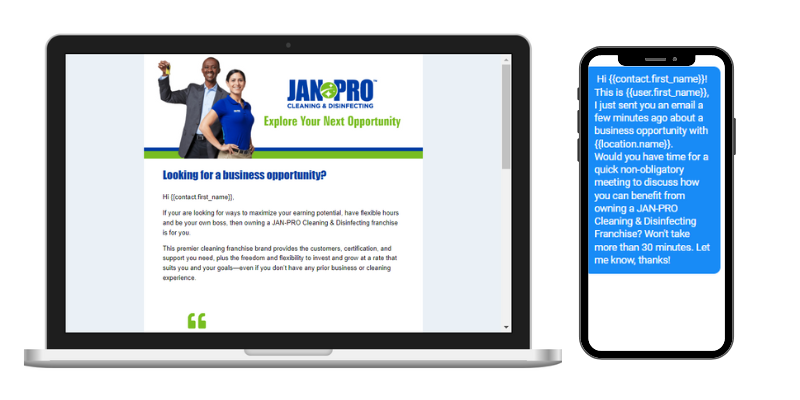
The system automatically broadcasts a series of SMS and emails to the lead on strategic timings that matches your sales cycle. The email messaging is structured to introduce your brand, build trust, differentiate yourself from competitors, and provide answers to FAQs.
Stage 2 - Qualified Lead

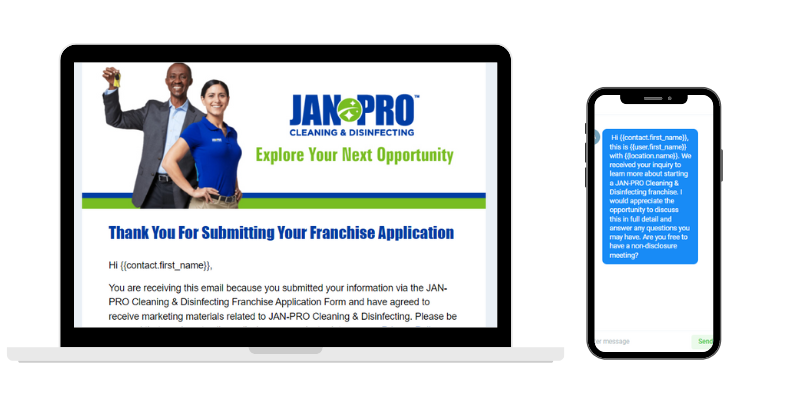
Leads who submitted a franchise application form is automatically added to this stage.

Leads are automatically removed from this stage when a Disclosure Meeting is requested.

Will leads automatically be moved to this stage based on a triggered event, or does the lead need to be moved here manually by a sales team member?

This is an automated stage.

The system automatically sends out two nurture emails to the leads at this stage. The emails are spaced three days apart with the primary Call-to-action of Request a Disclosure Meeting.

The emails are structured to have an organic and personal feel to them as if the sender of the emails is the assigned user and not system-generated. This helps build rapport with the lead.
Stage 3 - Scheduled Disclosure

Leads are automatically added into this stage when a Disclosure Meeting is requested via the online scheduler.

Leads are automatically removed from this stage as soon as they are progressed to the next stage.

Will leads automatically be moved to this stage based on a triggered event, or does the lead need to be moved here manually by a sales team member?


This is an automated stage.

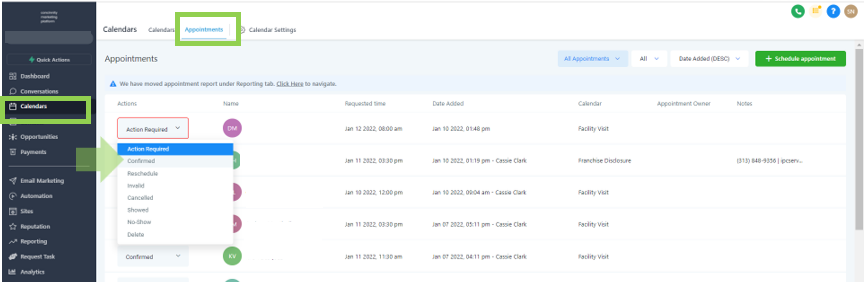
Appointment confirmation and reminders are sent to the prospect via email and SMS. Internally, the team is also notified when an appointment is requested. Note that the appointment needs to be confirmed in order to trigger the system-generated communications.
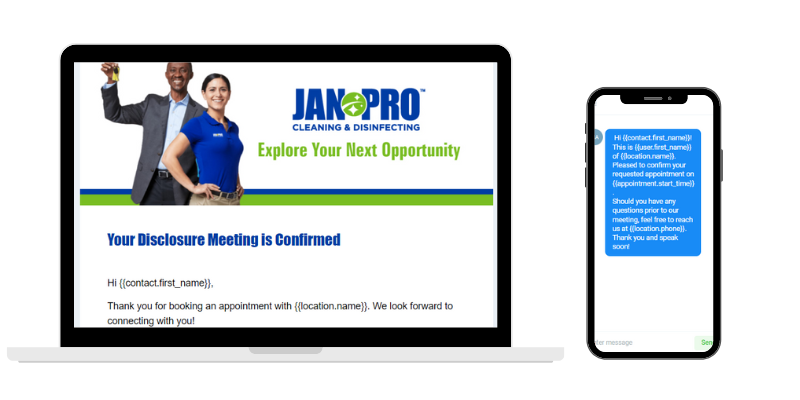
To confirm an appointment, go to calendars, click on appointments, select contact and choose “Confirmed”.
Stage 4 - Disclosed

This is a manual stage that the assigned users may utilize upon fulfillment of the Franchise Disclosure Meeting.

Leads are manually added into this stage by the assigned user as deemed applicable.

Leads are automatically removed from this stage as soon as they are progressed to the next stage.

Will leads automatically be moved to this stage based on a triggered event, or does the lead need to be moved here manually by a sales team member?

This is a manual stage.

There is no automation set up for this stage to avoid interfering with any ongoing conversations between the prospect and the sales team.

Stage 5 - Processing

Leads are manually added into this stage by the assigned user.

Leads are manually added into this stage by the assigned user.

Leads are automatically removed from this stage when a requested Closing Meeting is confirmed.

Will leads automatically be moved to this stage based on a triggered event, or does the lead need to be moved here manually by a sales team member?

This is a manual stage.

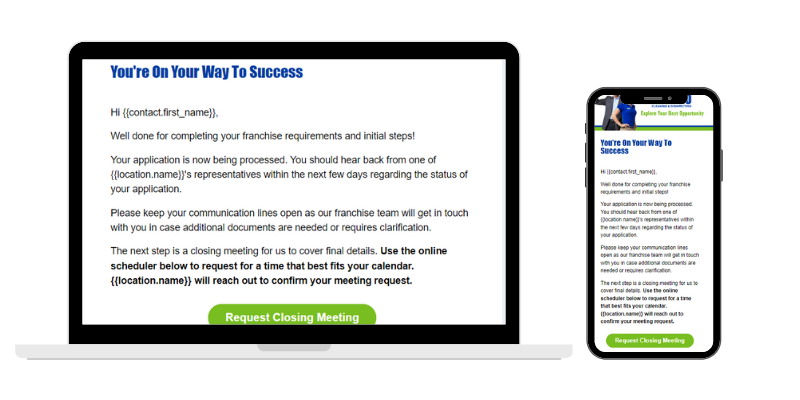
A system-generated email is sent to leads on the “Processing” Stage to update the prospective client regarding the status of their application along with an invitation to request for a Closing Meeting.
Stage 6 - Scheduled Closing Meeting

Leads are automatically added into this stage when the request for a Closing Meeting has been confirmed by the Team. Assigned users receive a notification for every meeting request

Leads are automatically added into this stage when they request for a Closing Meeting via our online scheduler. Assigned users receive a notification for every meeting booked and are to confirm the appointment to trigger the automation for this stage.

Leads need to be manually removed from this stage.

Is this a manual or automated stage?
Will leads automatically be moved to this stage based on a triggered event, or does the lead need to be moved here manually by a sales team member?

This is an automated stage.

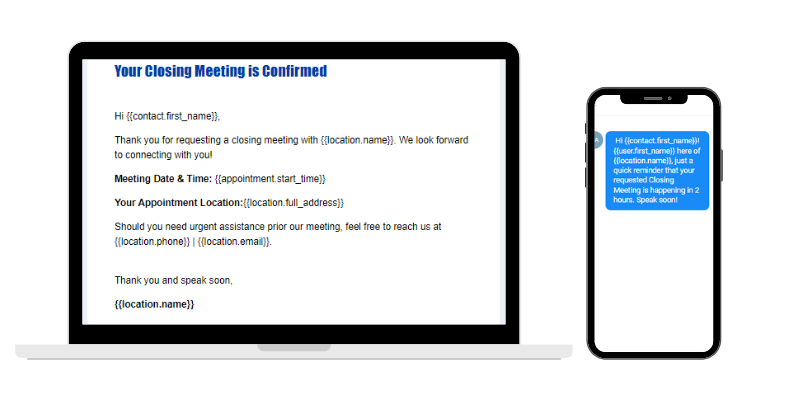
Once the Closing Meeting request is confirmed by the team, meeting confirmation and reminders are sent out to the prospective client via email and SMS.
FAQs

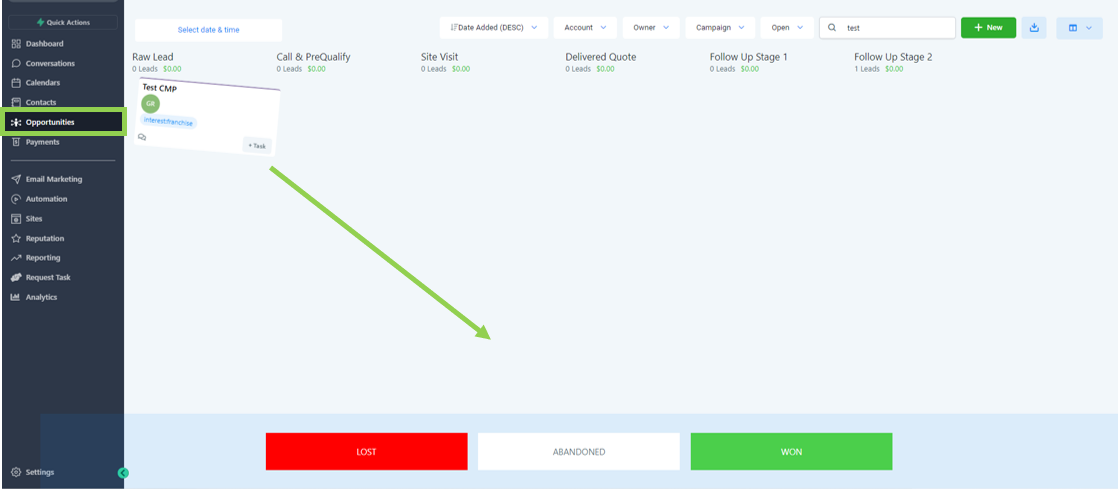
To update the opportunity status, simply go to opportunities, select the opportunity you’d like to update, and drag the lead to either lost, abandoned, or won.
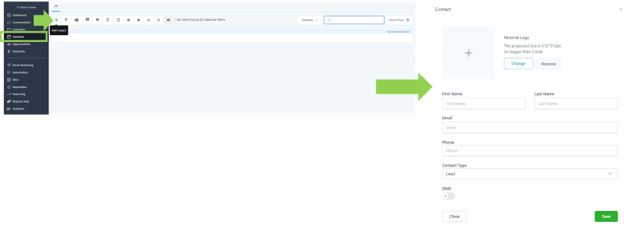
To manually create a contact, go to “ contacts ”, select the plus sign, input the contact details and hit save.
 

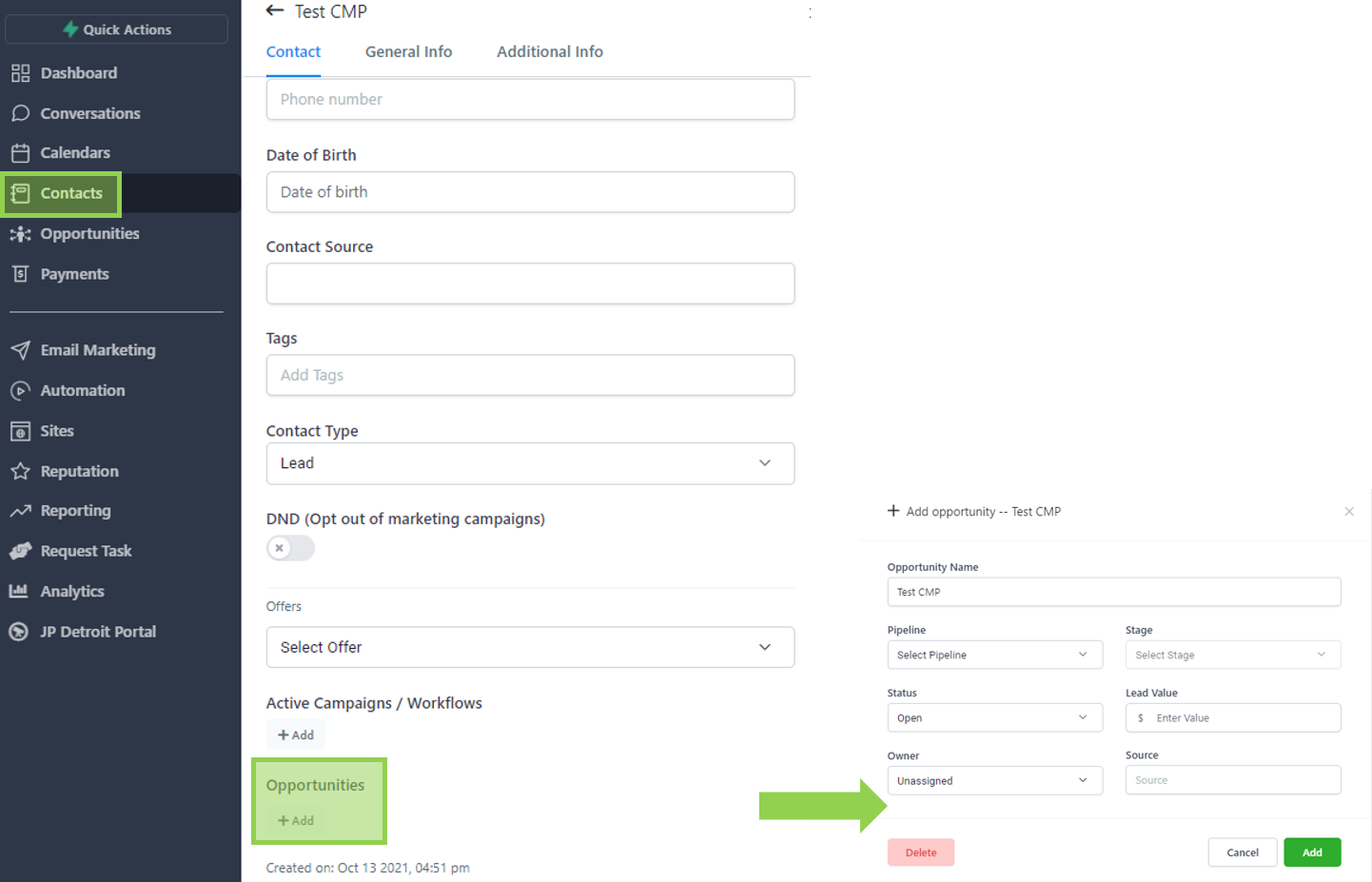
To create an opportunity manually, go to contacts, select the lead you wish to add to the opportunity pipeline, and click “Add” under the Opportunities field.

Once clicked, a pop-up will appear asking you for the corresponding details as shown below.
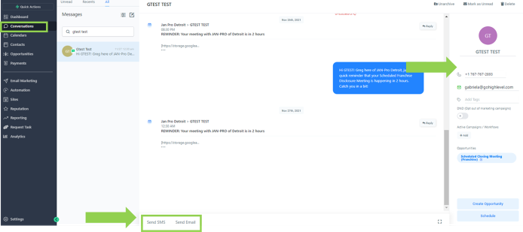
Go to the conversations panel of CMP in order to view and respond to calls, emails, SMS, Facebook messages and GMB reviews.

Alternatively, you can also go to a specific contact to view and respond to these actions.
The Value of This Offering

Leads falling through the cracks, appointments missed and promotional offers sent a day late are just a few of the many pain points encountered by JAN-PRO certified business owners. Not to mention the overwhelming tasks to organize the leads, manage conversations, follow up and keep the opportunities engaged until closed.

Concinnity’s Pipeline Automation System is designed specifically for the JAN-PRO business model and target market. 

This done-for-you opportunity management system is tried and tested to promote efficient opportunity management, increase overall conversion rate of your sales pipeline and unload your team from admin work.

Imagine an infrastructure built with manual and automated touchpoints to deliver personalized interactions while reducing the admin work of your team. Through automations, we will progress your leads further down your sales funnel via various channels, from the discovery phase all the way to the closing stage. Specific stages are open for the sales team to manually touchbase with their prospects as deemed fit.

Key Benefits

  • Never lose touch with a lead again
  • Grow your business with increased conversion rate
  • Enhance appointment turn-up rate and decrease fallout
  • Reduce admin work so you can focus on revenue-generating tasks
  • Organize and keep track of all your opportunities, conversations and appointments in this all-in-one platform

How it Works

Concinnity’s Pipeline Automation System is a powerful tool to manage your sales  opportunities on various stages of the funnel. Here’s a sneak peek on how it works.

Project Phases

Scope of Work

Design

Groundwork

Talk through the sales stages and map the desired customer experience between drip emails and text messages. While we already have the working automation utilized by many JAN-PRO business owners, we still want to make sure it’s tailor-fit to your vision.

Customize CRM program

Take existing pipelines and ensure that they fit the sales cycle of your business. Introduce new stages, and customize fields inside of the system to accurately collect the right data for each customer.

Build Miro Board

Visually map out the stages and drip campaign flow so that all stakeholders can see the campaign structure and understand key pain points in the conversion and sales process.

Identify required brand assets

Reference competitor resources and collect your organization’s brand collateral to create aesthetically pleasing and onbrand email headers, images, and media materials.

Identify target audience

Identify the categories of customers intended for these campaigns, and consider and variations from the default campaign strategy that may need to be generated. 

Explore this sample Miro Board.

Development

Build triggers

Create the automation triggers that connect leads from one campaign to the next, and create the journey across your sales stages.

Build campaigns/emails

Design and write the email content for each email in all drip campaigns. 

Build Workflow

Design the email drip campaign flow, linking each email to its corresponding campaign.

Automation testing

Test leads as they move through the workflows and systems. 

Request and implement brand assets

Finish styling the email content so that language content can be reinforced with visual appeal to drive value across the campaigns. 

Internal Review & Approval

Concinnity Digital internally reviews the flow and user experience of campaigns.

Client Review & Fine Tuning

Submit CRM Proposal to Client

Submit an official project proposal, including all the previous campaigns and work for review.

Polish programs based on client feedback

Take your feedback and revise the campaigns, emails, and messaging as needed.

Finalize Audience

Confirm details around key points of language, who will be receiving these campaigns and what value propositions are they most receptive too.

Produce Campaign Assets

Bring all assets together inside of the CMP and have the stages, campaigns, and triggers linked and working together in harmony.

Implementation

Client Testing

Test the lead flow and experience from the client perspective.

Deploy to live

Deploy campaigns live for official publishing.

Post-implementation Assessment

Apply any fixes needed

Any fixes required, as found by internal team members of the client organization are brought to our teams’ attention and fixes are made quickly and seamlessly.

Monitor & measure campaign performance

Measure campaign performance, and watch conversion rates as leads go through the sales funnel.